
What if the most useful heart-rate number on the gym floor isn’t the one that flashes brightest, but the one a coach can put in context? Real time heart rate gym software can make effort easier to see across a class, but the data alone won’t tell you who needs a cue, a recovery, or a change of pace.
If you’ve struggled to assess effort consistently, juggle disconnected systems, or explain numbers that distract members, live visibility can help when it supports coaching rather than competing with it.
This guide explains what heart-rate software can show during a workout, what it can’t tell you on its own, and which features matter in a gym setting. You’ll get a practical framework for comparing live displays, data workflows, scoring, and member engagement, plus guidance on turning workout information into clearer coaching decisions.
Heart-rate tools and broader performance platforms serve different roles. VO2WOD’s Live Athlete Performance Dashboard provides live workout performance visibility, while automated workout scoring and Vo2hub support connected gym workflows. Understanding what each tool does helps you choose the right setup for your coaches and members.
Key Takeaways
- Real time heart rate gym software presents data captured by a sensor. Keep that distinction in mind when evaluating what a system does.
- Put live readings beside the workout plan, movement quality, and athlete feedback instead of treating one number as a complete measure of effort or readiness.
- Compare tools by data source, live visibility, class use, history, and workflow fit to see whether they support the way your gym coaches.
- Introduce live tracking with a clear coaching purpose, then pilot it to assess screen visibility, staff workload, and member understanding.
- Connect workout visibility with broader gym workflows: VO2WOD includes a Live Athlete Performance Dashboard, automated workout scoring, and Vo2hub to centralize workout data and support member engagement.
What Real-Time Heart Rate Gym Software Does During a Class
Real time heart rate gym software receives, organizes, and presents heart-rate information during training. Depending on the system, a coach may see an athlete’s current reading, a zone, a changing trend, or a class-level view that brings several athletes’ data together. The purpose is to make one part of the workout easier to observe, not to replace the coach’s eye.
The sensor and the software have different jobs. A sensor measures heart rate; software may receive that information, display it, and store it for later review. A shared gym screen can make readings visible to the group, while a coach’s device or individual view may show information in a different format. Features and workflows vary between systems.
How heart-rate data moves from athlete to gym display
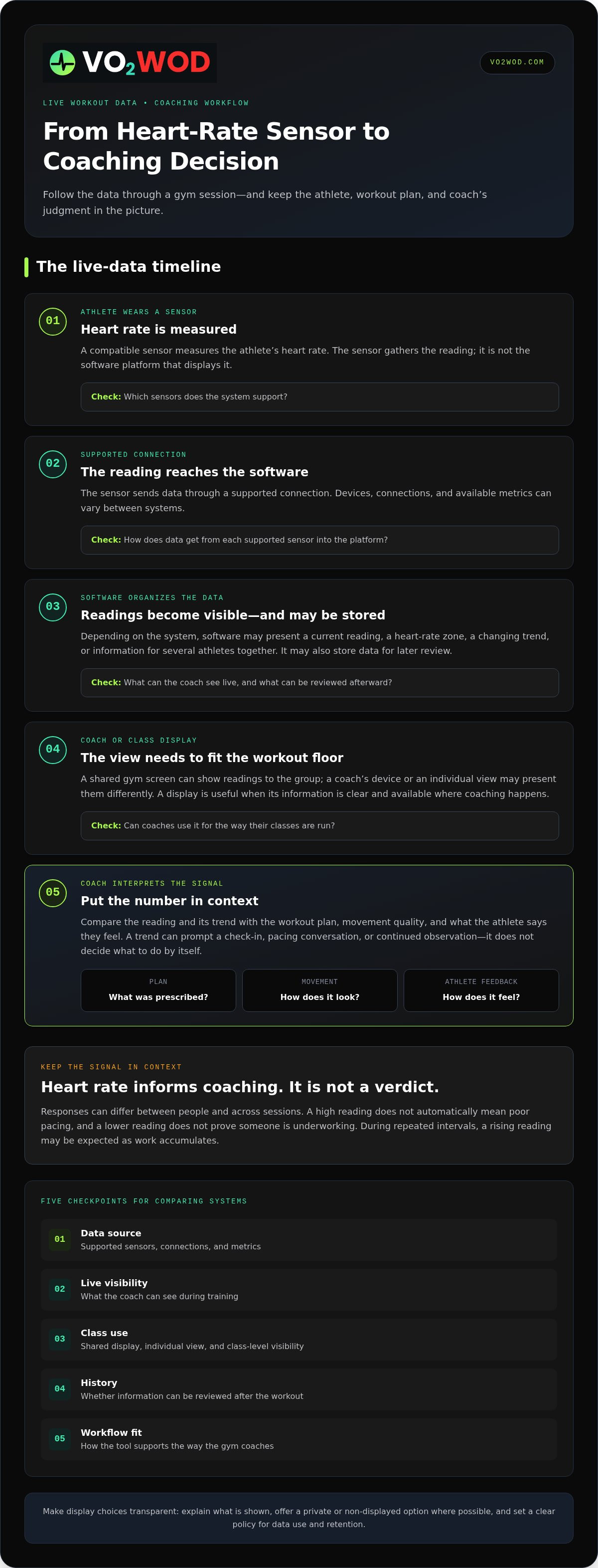
The process starts with an athlete wearing a compatible sensor. That device measures heart rate and sends data through a supported connection to software, which may organize readings for a coach or shared display. A heart rate monitor can use different measurement approaches, so the sensor is not the same thing as the platform presenting its data.
For a class, map each step: which sensors are supported, how data reaches the software, what the coach can see, and whether information can be reviewed afterward. Don’t assume every system supports the same devices, connections, or metrics. A live display is useful only when the data is clear and available where the coach needs it.
Heart-rate zones are context, not a coaching verdict
Heart-rate zones are ranges used to put an athlete’s current cardiovascular response into context. A system may show an individual’s zone or a broader class view, depending on its features. Zones can help a coach notice patterns during a workout, but they don’t explain on their own why someone is in a particular range.
Readings and responses can differ between people, and the same athlete may respond differently across sessions. Compare the number with the planned workout, movement quality, and what the athlete says they’re feeling. A high reading doesn’t automatically mean poor pacing; a lower one doesn’t prove an athlete is underworking.
Heart rate adds a useful signal to coaching judgment; it doesn’t make the judgment for you. A reading might prompt a coach to check in, observe technique, or ask how an athlete feels before changing the workout. That human context keeps the display useful rather than distracting. Performance dashboards and workout scoring can support a gym’s broader data workflow as well.
How Coaches Can Interpret Live Heart-Rate Metrics Without Losing the Human Side
A live reading can catch a coach’s attention. It shouldn’t make the decision for them. Read heart-rate information beside the workout plan, the athlete’s movement, and what they report feeling. That fuller picture helps a coach decide whether to check in, reinforce pacing, or simply keep observing.
For example, during repeated intervals, a rising reading may be expected as work accumulates. If the athlete’s movement remains controlled and they describe the effort as manageable, the number alone doesn’t call for an automatic change. If their form shifts or they say they’re struggling, the reading becomes one more reason to start a conversation.
Use heart-rate trends to support individual coaching
Look at how a reading changes across intervals, not just where it lands at one moment. Pair that pattern with visible movement and the athlete’s own account of effort. If individualized zones are based on testing, resources on translating VO2 data into training zones can help explain how physiological information may inform training context. Don’t turn a general zone into a universal target or a diagnosis.
Heart-rate responses can vary between people and sessions. Use the display to support a pacing conversation, build awareness across the class, or guide post-workout reflection. Ask what the athlete noticed and compare that with the workout they completed. A trend can open a useful conversation; it can’t reveal the whole story on its own.
Live metrics inform coaching; they don’t replace it.
Keep shared leaderboards motivating and inclusive
A shared display can create energy when members understand what they’re seeing and why it matters. Ranking athletes only by absolute heart-rate values can turn an individual response into a misleading contest. If the software supports them, consider highlighting personal progress, time spent in a chosen effort range, or consistency instead. The goal is participation, not a scoreboard that rewards one kind of response.
Make display choices part of the class setup. Explain what information is shown, offer a private or non-displayed option where possible, and set a clear policy for how workout data is used and retained. Obtain member consent as appropriate, and verify applicable privacy requirements for your facility. A transparent approach helps members feel included rather than watched.
Keep your wider performance workflow just as clear. VO2WOD’s Live Athlete Performance Dashboard and automated workout scoring support workout visibility and review. Explore VO2WOD gym performance tools as part of building a more connected coaching workflow.
How to Compare Real-Time Heart Rate Gym Software Features
A feature list can look impressive and still leave coaches managing extra screens, unclear readings, or missing workout records. Compare real time heart rate gym software against the flow of an actual class: where the data comes from, what staff and members can see, and what happens when the signal drops.
| What to compare | What to look for | Why it matters |
|---|---|---|
| Data source | Which sensors and connections the platform documents as supported. | Compatibility determines whether readings can reach the software in your setup. |
| Live visibility | Whether coaches can view individual readings, group-level information, or both. Check that labels and values are readable at a glance. | A busy screen can add friction instead of helping a coach scan the room. |
| Class use | How information appears during sessions, including available screen options and what members can understand without repeated explanation. | The display should support coaching and participation, not interrupt them. |
| History | Whether workout data can be reviewed later and how it fits with training records. | Useful context can carry beyond the live class, if the system supports it. |
| Workflow fit | How the platform fits staff routines, member experience, data management, and your response when a feed is interrupted. | The full workflow matters more than a single feature. |
Which software capabilities matter most on the gym floor?
During a class, coaches may need to scan a group view and then check one athlete’s reading. Members need feedback they can interpret without turning every session into a tutorial. Consider readability from the coaching position, how the system signals missing data, and what staff must do when a connection is disrupted. Review documented integrations and screen options rather than assuming devices or displays will work across systems.
Also consider the workload around the live view: does staff setup fit naturally into class preparation, and can the gym manage workout data without creating a separate manual process? A smooth display is only one part of the experience.
Heart-rate software versus broader performance dashboards
Heart-rate software focuses on capturing, displaying, and helping coaches interpret cardiovascular readings. A broader performance dashboard may organize workout metrics, scores, and training records. These tools can complement each other, but they aren’t interchangeable.
For example, VO2WOD’s Live Athlete Performance Dashboard provides workout performance visibility, and its automated workout scoring supports workout records. For context on how wider gym systems fit together, read this functional fitness gym software guide. Compare each tool by the job it performs, then judge how the pieces work together for coaches and members.
How to Introduce Live Heart-Rate Software in a Functional Fitness Gym
A smooth rollout starts with a coaching need, not a screen. Decide what live heart-rate information should help coaches do, such as support pacing conversations during intervals or prompt a post-workout check-in. Then map where the sensor, software, display, coach, and member fit into class preparation and delivery. This makes it easier to spot extra steps before they become part of every session.
Start small. Run a limited pilot session and review three things: whether coaches can see and interpret the display, how much staff effort setup and troubleshooting require, and whether members understand what the information means. A pilot gives you room to adjust the workflow before making it a regular part of classes.
A useful live display starts with a clear coaching goal, then shows only the information that helps serve it.
Prepare coaches and members before the first live session
Before class, walk coaches through the display, what its readings can and can’t tell them, and what to do if a sensor, connection, or screen stops working. Keep the fallback simple: continue coaching from the workout plan and direct observation rather than pausing class to troubleshoot. Tell members what information may appear, why it’s being used, and how the gym manages its visibility.
Agree on practical expectations in advance. Explain where readings might be visible, how long workout records are kept, and which staff can access them. Set these policies around the system and your facility’s needs, and communicate them in plain language. Clarity helps members focus on training instead of wondering where their information goes.
Review whether live data improves the class experience
After the pilot, gather feedback from both coaches and members. Ask whether the display was easy to read, whether it added work, and whether the readings supported useful pacing conversations or post-workout reflection. Don’t assume that a busier screen means better engagement. Look for specific moments when the information helped, and note when it distracted from coaching.
Use that review to refine the class workflow: adjust how the screen is used, repeat the pilot with a different workout format, or decide that a live display isn’t useful for every session. Data management is part of the same picture. This centralized gym data platform guide explores how connected records can fit into broader facility operations.
For gyms building a wider performance workflow, VO2WOD’s Live Athlete Performance Dashboard provides workout performance visibility, with automated workout scoring and Vo2hub supporting workout data and member engagement. Explore VO2WOD’s gym performance platform as you plan how live class information fits alongside other gym workflows.
Where VO2WOD Fits in a Broader Gym Performance Workflow
Live heart-rate tracking and gym performance software can serve related but different purposes. Real time heart rate gym software focuses on cardiovascular readings captured by compatible sensors. A broader gym platform can help staff organize workout performance, scoring, and member data. Seeing the distinction makes it easier to build a connected workflow without assuming every tool performs the same job.
Connect live workout visibility with scoring and gym data
VO2WOD’s Live Athlete Performance Dashboard visualizes performance during workouts, while automated workout scoring supports the gym’s scoring routine. Coaches can use these capabilities within broader class and performance workflows, with workout information centralized for review. These tools give coaches ways to organize and follow workout performance.
Vo2hub centralizes workout data and supports member engagement. For staff, keeping workout information together can reduce the friction of piecing records together across disconnected processes. For members, a central place for workout information can make it easier to stay connected to their training. The benefit is a clearer path from class activity to organized records, while coaches continue to interpret performance in context.
Explore a calmer, more connected gym workflow
For functional fitness facilities, VO2WOD brings gym management and performance tracking together with automated scoring. Rather than treating a live display as the whole system, gyms can consider how workout visibility, scores, and centralized records fit into daily operations. If a facility is moving from legacy software, data migration support helps with the transition.
Choose tools by the work they actually do. A specialized heart-rate system can handle sensor readings, while a broader platform can organize workout performance and gym data. Keeping those roles clear helps staff avoid duplicate effort and set accurate expectations for members.
VO2WOD’s dashboard, automated scoring, and Vo2hub bring workout performance and gym data into a connected workflow.
Make Workout Data Work for Your Gym
The best real time heart rate gym software supports coaching, not assumptions. Treat readings as one signal alongside the workout plan, movement quality, and athlete feedback. Compare systems by how well they fit your class workflow, keep displays clear, and help staff manage information without adding unnecessary steps.
Live heart-rate tools focus on cardiovascular readings. Broader performance platforms can support workout visibility, scoring, and organized gym data. VO2WOD brings those broader workflows together with its Live Athlete Performance Dashboard, automated workout scoring, and Vo2hub. Data migration support can also help gyms transition from legacy systems.
Choose a clear coaching purpose, introduce new tools thoughtfully, and review whether they genuinely help your coaches and members. A more connected workflow can make workout records easier to manage and performance easier to discuss. Explore the VO2WOD platform for connected gym performance workflows and take the next step toward clearer gym operations.
Frequently Asked Questions
What does real-time heart rate gym software do?
Real time heart rate gym software receives heart-rate data from a compatible sensor and presents it during training. Depending on the system, coaches may see individual readings, heart-rate zones, changing trends, or a group view. Some platforms also store workout information for later review. The software organizes and displays data; the sensor measures heart rate. A coach still needs to interpret readings alongside the workout, movement quality, and athlete feedback.
Can gym software show heart rates on a TV screen?
Yes, some systems can show live heart-rate information on a shared screen, including a gym TV, if the software supports that display setup. The sensor must send data through a connection the system supports, and the display needs to be readable from the workout area. Screen options differ between platforms. Before using a shared view, decide what information members will see and explain how it will be used.
How does heart-rate zone software work in a group workout?
Heart-rate zone software organizes readings into ranges to help put cardiovascular effort into context. In a group workout, coaches may view individual zones or a class-level display, depending on the system. Zones can help prompt a pacing check-in, but they aren’t universal effort targets. Members respond differently to the same workout, so coaches should consider movement, the planned session, and what each athlete says they’re feeling.
Is real-time heart-rate tracking useful for functional fitness gyms?
It can be useful when it serves a clear coaching purpose, such as helping a coach notice patterns across intervals or supporting post-workout reflection. Live tracking is less helpful if numbers distract members or create extra work without improving a class. Try it in a limited session first. Gather feedback from coaches and members, then assess whether the readings supported useful conversations and fit naturally into the workout.
Do gyms need special heart-rate monitors for live tracking?
Gyms need sensors that the selected software supports for live tracking. A monitor measures heart rate; the software receives and displays the information through supported connections. Device compatibility, connection methods, and available metrics vary across systems, so don’t assume a monitor will work with every platform. Review compatibility documentation for the setup you plan to use, and have a simple coaching fallback if readings aren’t available during class.
What is the difference between heart-rate software and a gym performance dashboard?
Heart-rate software focuses on receiving, displaying, and organizing cardiovascular readings. A broader gym performance dashboard may show workout performance, scores, or training records. VO2WOD’s Live Athlete Performance Dashboard provides workout performance visibility, and the platform includes automated workout scoring and Vo2hub for centralized workout data. These capabilities support gym performance workflows.
How can a gym introduce live heart-rate tracking without distracting members?
Start with one coaching goal and a limited pilot session. Show staff how to use the display, explain its limits, and tell members what information will appear and how visibility is managed. Keep the screen focused on the readings that support the goal. Prepare a fallback for sensor, connection, or screen interruptions, then collect feedback to see whether the data helped coaching or became a distraction.


