

What if the numbers on your gym TVs could do more than show who’s working hardest? Gym display heart rate tracking can turn a tough class into a shared, data-informed experience. Members can see effort as it changes, while coaches get another cue to consider as they guide the session.
If you’re wondering how to show members’ heart rates on gym TVs during a workout, the screen is only one part of the setup. You also need compatible devices, a reliable way to bring readings together, and clear expectations about what members will see. Without those pieces, another disconnected screen can add friction instead of energy.
This guide explains how real-time heart rate displays work, what to check for device and software compatibility, and how effort-based challenges can include members with different fitness levels. You’ll also learn how a Live Athlete Performance Dashboard can make live metrics easier to review and how Vo2hub centralizes workout data. The goal is a more connected class, clearer coaching cues, and a gym experience where progress can be discussed.
Key Takeaways
- Learn how gym display heart rate tracking brings individual wearable data into a shared group workout view.
- Explore effort-based challenges that make friendly competition more welcoming across different fitness levels.
- See how coaches can use live heart rate information as one cue when checking effort and adjusting their coaching.
- Review setup considerations for TV displays, device compatibility, connectivity, and screen placement.
- Find out how the VO2WOD Platform and Automated Workout Scoring can connect live workout data with recorded results.
What is Gym Display Heart Rate Tracking?
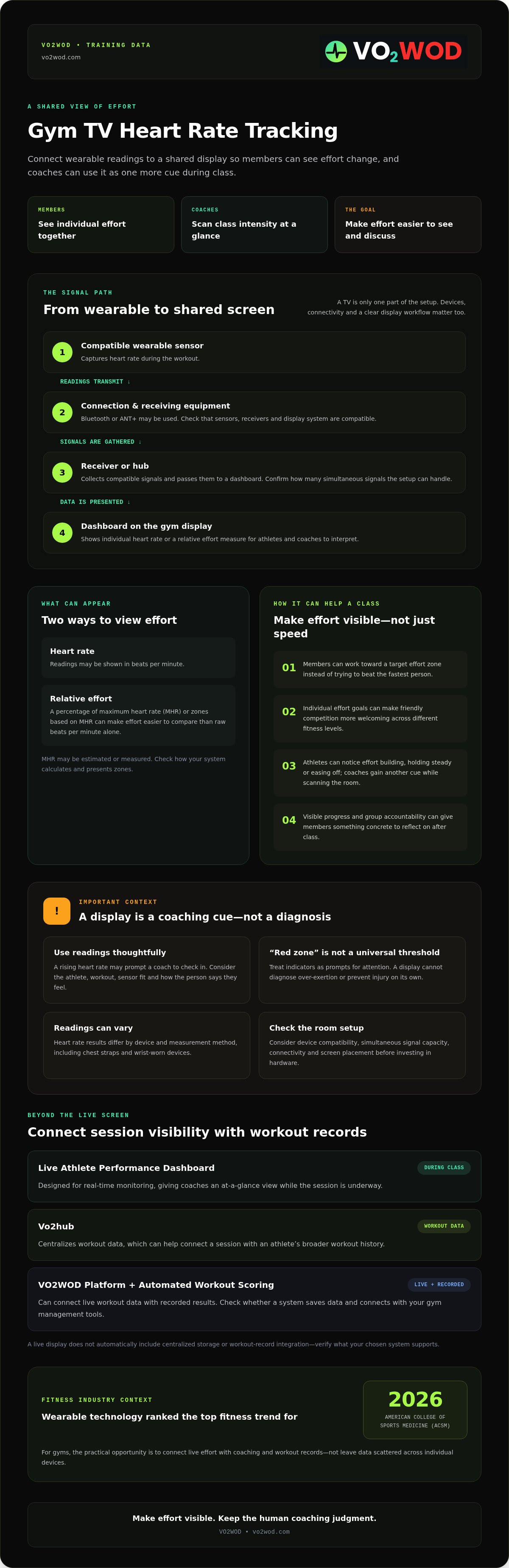
Gym display heart rate tracking sends live readings from compatible wearable sensors to a shared screen. Instead of each member checking a watch or strap alone, the class can see effort unfold together. This shift from individual tracking to shared biofeedback can make pacing more visible and give coaches another cue during group workouts.
A heart rate monitor measures the heart’s beats over time. In a gym setup, compatible sensors transmit readings to receiving equipment, which passes them to a display. The screen might show each athlete’s heart rate or a percentage of maximum heart rate (MHR). A relative measure can make effort easier to compare than raw beats per minute alone. MHR may be estimated or measured, so check how your chosen system calculates and presents zones.
A connected gym experience is about more than putting a TV on the wall. Wearable technology was ranked the top fitness trend for 2026 by the American College of Sports Medicine (ACSM). For gyms, the practical opportunity is to connect live effort with coaching and workout records rather than leave data scattered across individual devices. The Live Athlete Performance Dashboard is designed for real-time monitoring, while Vo2hub centralizes workout data.
How Real-Time Biofeedback Works
A sensor captures heart rate and sends readings to compatible receiving equipment. The system processes the signal and presents it in a form athletes and coaches can interpret, such as beats per minute or effort zones based on MHR. In a gym, biofeedback means information about the body is available during a workout, when it may help someone assess their effort.
That information can help a coach notice when an athlete’s effort is rising or falling, rather than relying only on observation. It is a coaching cue, not a diagnosis or a substitute for an athlete’s own judgment.
The Technology Powering the Display
Many heart rate monitors use Bluetooth or ANT+ for device connectivity. Neither protocol is automatically right for every group setting. Compatibility depends on the sensors, receivers, and display system you choose. Before investing in hardware, confirm which devices are supported and how many simultaneous signals the setup can handle.
A receiver or hub gathers compatible signals and passes them to a dashboard for presentation. Some systems also connect workout records to centralized or cloud-based storage, but don’t assume every live display includes that feature. Check how data is saved and whether it connects with your gym management tools. A screen shows numbers; an integrated dashboard can help make those numbers part of a more organized coaching and workout-record workflow.
The Benefits of Visualizing Athlete Effort
A screen earns its place in the gym when it helps people make decisions, not just when it looks impressive. A shared view of effort can give members a clear goal, encourage friendly competition, and help coaches scan the room without trying to track every athlete from memory. That’s the practical value of gym display heart rate tracking: it makes workout intensity easier to see and discuss.
For example, members can work toward a target effort zone instead of trying to beat the fastest person in class. This can make a challenge more inclusive for people with different fitness levels. Coaches get a broad view of class intensity, while athletes can notice whether their effort is building, holding steady, or easing off. Clear visual cues can add structure to a busy session.
Driving Member Retention with Data
Visible progress can make a workout feel more rewarding. Members see effort register in the moment, then have something concrete to reflect on after class. Group accountability can add a social element, too. Athletes can encourage one another while following individual effort goals instead of competing only on speed or load.
After class, centralized workout data in Vo2hub can help a gym review information beyond the live display. This can connect a single session to an athlete’s broader workout history. The Live Athlete Performance Dashboard supports real-time monitoring, giving coaches an at-a-glance view while the session is underway.
Safety and Injury Prevention
A rising heart rate may prompt a coach to check in, especially if an athlete appears to be struggling. But a display can’t diagnose over-exertion or prevent injury on its own. Treat “red zone” indicators as prompts for attention, not universal medical thresholds. Coaches should consider the athlete, the workout, sensor fit, and how the person says they feel.
Heart rate readings also vary by device and measurement method. A study comparing commercial monitors with electrocardiography offers context on their performance, including differences between chest straps and wrist-worn devices. Review the accuracy of heart rate monitors before deciding how much weight to place on a reading.
Used thoughtfully, live data gives a coach another way to guide effort. One athlete may need a cue to ease back; another may be ready to push. For gyms looking to bring real-time monitoring into a broader workout-data workflow, the VO2WOD platform for gyms is one option to explore.
Addressing Common Objections to Gym Displays
“Screens will distract members from proper form.” It’s a fair concern, especially in a fast-moving WOD. A display shouldn’t ask athletes to watch every number while they move. It should offer a quick reference before or between efforts, while the coach keeps form and safe movement at the center of the session. Data can add context to a coach’s cues, including when an athlete may need to ease off or adjust intensity.
Privacy deserves equal care. Explain what information is collected, why it’s displayed, who can see it, and how it’s stored. Collect only what the workout needs, and give members a clear way to understand their options. Shared feedback should build trust, not make anyone feel monitored without explanation.
Is the Tech Too Complicated?
It can be if heart rate data sits in one tool, workout scores in another, and gym records somewhere else. A centralized gym data platform can help reduce that fragmentation. VO2WOD offers a Live Athlete Performance Dashboard for real-time monitoring, Vo2hub for centralized workout data, and Automated Workout Scoring. Before selecting a setup, confirm which devices and data flows it supports.
Automation can also reduce administrative work after class, leaving coaches more attention for athletes. In functional fitness, the most useful interface is one people can read quickly without disrupting their coaching rhythm. Look for a clear view of the workout and a process that fits how your team works.
Managing the Information Overload
More data isn’t automatically more useful. During a WOD, a display crowded with readings can compete with coaching cues and movement. Keep the view simple: show only metrics that help athletes and coaches make a decision in that moment. Make text readable from the workout floor, and avoid placing screens where members must turn away from movement to check them.
For many group sessions, effort zones or percentage of maximum heart rate can be easier to interpret than raw beats per minute alone. They offer a relative view of intensity, though estimates and sensor readings have limitations. Explain what the numbers mean, and remind members that the display is a guide, not a scorecard or medical assessment.
DIY or dedicated system? A DIY arrangement may suit a gym testing the idea, but staff should account for setup, device compatibility, troubleshooting, and how results connect to existing records. A dedicated display system may bring those pieces together, but compare its capabilities and ongoing requirements with your actual coaching workflow. The right choice makes gym display heart rate tracking clearer for athletes and simpler for the team, not another screen to manage.
Setting Up Your Gym Leaderboard for TV Screens
A reliable leaderboard setup starts with the room and the workout, not just the TV. Members should be able to read the display between efforts without turning away from movement, and coaches should be able to see it without losing sight of the class. Place screens where they’re visible from key workout areas, but outside lifting, running, and equipment paths. In a high-impact space, choose a mounting position and method suited to the wall and gym environment.
The Hardware Checklist
Before choosing hardware, confirm what your display system supports. Many heart rate monitors use Bluetooth or ANT+, but receiver requirements and the number of simultaneous signals vary by system. Ask the provider to confirm compatible sensors, receivers or ANT+ bridges, and any requirements for smart TVs or connected display devices. Then test signal coverage from different parts of the workout floor, including areas behind equipment or walls.
Stable connectivity matters for live data. A wired network connection may be an option for fixed display equipment, while Wi-Fi can be practical where cabling isn’t available. Don’t assume one will work better in every facility. Test the connection during a class, when the room is active, and check the chosen system’s recommendations. For software context, see this guide to functional fitness gym software.
Software Integration Steps
A dashboard is most useful when live readings fit the gym’s wider workflow. The Live Athlete Performance Dashboard supports real-time monitoring, while Vo2hub centralizes workout data. Before setup, confirm how your system handles member profiles, wearable connections, class types, and historical records. Don’t assume every wearable or gym management platform connects automatically.
Use this practical sequence to prepare for a session. Exact controls vary by system, so follow its setup guidance:
- Check the display and connection. Turn on the TV or display device and confirm it can reach the dashboard.
- Confirm the class setup. Select or prepare the appropriate session view, if your system supports class-specific configurations.
- Check athlete connections. Ask members to wear compatible sensors and verify that expected readings appear.
- Review visibility and privacy. Make sure the view is readable from the floor and matches what members have been told about data display.
- Start the session, then monitor. Keep coaching attention on the athletes and use the display as an additional cue.
A well-tested gym display heart rate tracking setup can bring order to a busy class without adding another manual task for coaches. Explore how the VO2WOD Platform supports gym data workflows.
The VO2WOD Advantage: Beyond the Screen
A live leaderboard can energize a class. Its longer-term value comes from connecting that moment to the gym’s wider workout and management workflow. The VO2WOD Platform brings together gym management tools, while the Live Athlete Performance Dashboard supports real-time athlete monitoring and Vo2hub centralizes workout data. This gives gym owners a way to move beyond isolated screens and scattered records.
Think of the display as the start of the data journey, not the finish. Members see effort during class, and coaches can use workout records to review progress afterward. Automated Workout Scoring helps connect workout performance to recorded results. If you want heart rate readings to affect a score, confirm that your sensors and scoring workflow support that connection. Heart rate shouldn’t be presented as an automatic measure of workout success.
A Unified Approach to Gym Management
Running a gym involves more than coaching the session. Management work and payment administration can add friction around a busy day. The VO2WOD Platform includes gym management and automated payments alongside its workout-data tools. Before switching, check which functions fit your current processes and map out how member and workout information should move between systems. This guide to choosing a modern gym management platform can help you plan the transition.
If your gym already has records in another system, VO2WOD’s Data Migration Service can assist with the move. Clarify what data can be transferred and how it will be organized before you begin. A platform should support the people running the gym, not leave them carrying every task by hand. Connected workflows can make performance information easier to manage and give staff more room to focus on the community.
The Future of Your Gym
As your community grows, a consistent way to view live effort and centralize workout data can make coaching observations easier to revisit. The aim isn’t to automate the human part of fitness. It’s to reduce administrative work so coaches can spend more attention on members and less on reconciling separate records. That’s the practical promise of gym display heart rate tracking within a broader management ecosystem.
See how the Live Athlete Performance Dashboard could fit your gym’s workflow. Explore the VO2WOD Live Dashboard.
Make Every Workout Count Beyond the Screen
A leaderboard is most valuable when it supports the whole gym experience. Gym display heart rate tracking can make effort visible during class, but clear privacy practices, thoughtful setup, and attentive coaching keep the technology useful and member-focused.
The next step is connecting live engagement with a consistent way to manage workout records. The VO2WOD Platform brings together the Live Athlete Performance Dashboard, Vo2hub for centralized workout data, and Automated Workout Scoring. For gyms moving from another system, the Data Migration Service can help support the transition. These tools can reduce scattered administrative work and give coaches more room to focus on people, not paperwork.
You don’t need to change everything at once. Start by deciding what members and coaches need to see during a session, then consider how that information should fit into your broader gym workflow. A more connected operation can make progress easier to recognize and community easier to nurture.
Explore the VO2WOD Live Athlete Performance Dashboard and take a practical next step toward a more connected gym.
Frequently Asked Questions
What hardware do I need to show heart rates on my gym's TV?
You’ll generally need compatible heart rate monitors, receiving hardware supported by your tracking system, a TV or other display, and a way to run the dashboard. Some setups use Bluetooth or ANT+ receivers. Exact requirements depend on the devices and platform. Before buying equipment, confirm compatibility, how many signals the system can handle, and whether it needs an internet connection. Test the display and signal coverage across your workout floor.
Can members use their own heart rate monitors with VO2WOD?
VO2WOD offers a Live Athlete Performance Dashboard, but specific monitor compatibility depends on the devices and setup. Ask VO2WOD which devices and connection protocols the current dashboard supports before asking members to bring their own monitors. Check whether each monitor can connect to the gym’s receiving setup and whether readings can be matched to the right member. A quick test with the devices your members use can reveal connection gaps before class.
Is heart rate tracking beneficial for CrossFit and functional fitness?
It can be useful in CrossFit and functional fitness when coaches treat heart rate as one cue among several. A live view can help athletes gauge effort and help coaches scan class intensity, while movement quality and each person’s feedback remain central. Set a clear purpose for displaying the data, such as helping members pace intervals. Heart rate alone doesn’t measure technique, workout quality, or an athlete’s overall condition.
How many athletes can a single gym display track at once?
There isn’t one universal number. Capacity depends on the display platform, receiving hardware, connection method, and compatible sensors. Check the system’s stated limit for simultaneous athlete connections, then test it with the number of participants you expect in class. Confirm that each signal stays assigned to the correct member and remains readable on screen. Don’t assume a TV’s size determines how many monitors the system can track.
Does live heart rate tracking help with member retention?
It may support retention by making effort and progress more visible and giving members a shared way to engage during class. Friendly, effort-based challenges can help people with different fitness levels feel included without making every workout a contest of speed or weight. The display alone can’t guarantee members will stay. Coaches still need to create a welcoming experience, explain the data, and recognize individual progress beyond the numbers.
What happens if the gym Wi-Fi goes down during a live session?
The effect depends on how your display system connects and whether it requires internet access for live data. A Wi-Fi outage could interrupt data transmission or dashboard access, but don’t assume how a particular setup behaves offline. Ask the provider what continues working during an outage and whether readings are saved for later. Have a simple coaching fallback ready, such as using the workout plan and direct observation until the display is available again.
Is it hard to move my existing member data to the VO2WOD system?
VO2WOD offers a Data Migration Service to assist gyms moving data from existing software. How involved the transition is depends on your current system and the information you want to transfer. Before starting, ask what data can be migrated, how it will be organized, and what preparation your team needs to do. Clarifying those details helps set expectations and makes it easier to check member records after the move.
Can the display show workout scores and heart rates simultaneously?
The Live Athlete Performance Dashboard is described as integrating live metrics and scoring, and Automated Workout Scoring is part of the VO2WOD offering. The exact screen layout and whether both appear at once may depend on configuration and the workout setup. Ask VO2WOD to confirm how scores and heart rate data are displayed together, what devices are supported, and whether the view can be adjusted to keep key information easy to read during class.


