
What if the hardest part of a class schedule isn’t filling the spots, but keeping every coach, staff member, and member in sync? A gym class scheduling platform should do more than display a calendar. It should help your team keep class details, capacity, and bookings organized as part of the gym’s daily routine.
If you track changes across spreadsheets, messages, and separate tools, information can quickly drift. Staff may need to confirm which schedule is current, while members may be unsure when a class starts or whether they can book. A dependable process makes those details easier to manage without adding unnecessary work.
This guide explains what to look for in scheduling capabilities, how to compare standalone booking tools with broader gym management platforms, and what to ask about usability, costs, and data migration. You’ll also learn how to assess a platform’s fit with your wider operations, so you can choose a setup that works for members and coaches.
Key Takeaways
- Assess a gym class scheduling platform by testing real booking scenarios, not just looking at its calendar.
- Decide whether standalone scheduling or broader gym management software better fits your workflows, staff visibility, and plans to grow.
- Test class changes, cancellations, capacity limits, new-member bookings, and staff handoffs before choosing.
- Check which features are included, how easy the platform is to use, what it reports, what it costs, and whether you need data migration.
- Consider how VO2WOD’s confirmed tools for payments, workout scoring, member engagement, and coach performance data fit into your gym’s wider operation.
Why a Gym Class Scheduling Platform Matters Beyond Posting a Calendar
A class time changes, a session fills, or a coach needs an update. If the change appears in one calendar but booking details live in messages or a spreadsheet, members and staff may see different information. That can mean extra checking for staff and uncertainty for members before class begins.
A gym class scheduling platform is software that organizes class information and related booking workflows, with specific functions depending on the product. It can connect the information members use to plan, coaches use to prepare, and staff use to coordinate daily operations. For a neutral overview of the broader category, see Appointment scheduling software.
Where manual class scheduling creates friction
Manual processes can work at first, but every extra place that needs an update creates another chance for details to drift. A class change might be posted in a group message but missed on the shared calendar. Members then ask whether the original time still applies, and staff spend time confirming which version is current.
Coaches need visibility into their assigned classes and changes that affect them. Members need clear details about when a class runs, whether space is available, and how to book. When those answers are hard to find, the process can feel confusing, especially for someone new to the gym.
What a scheduling platform should help coordinate
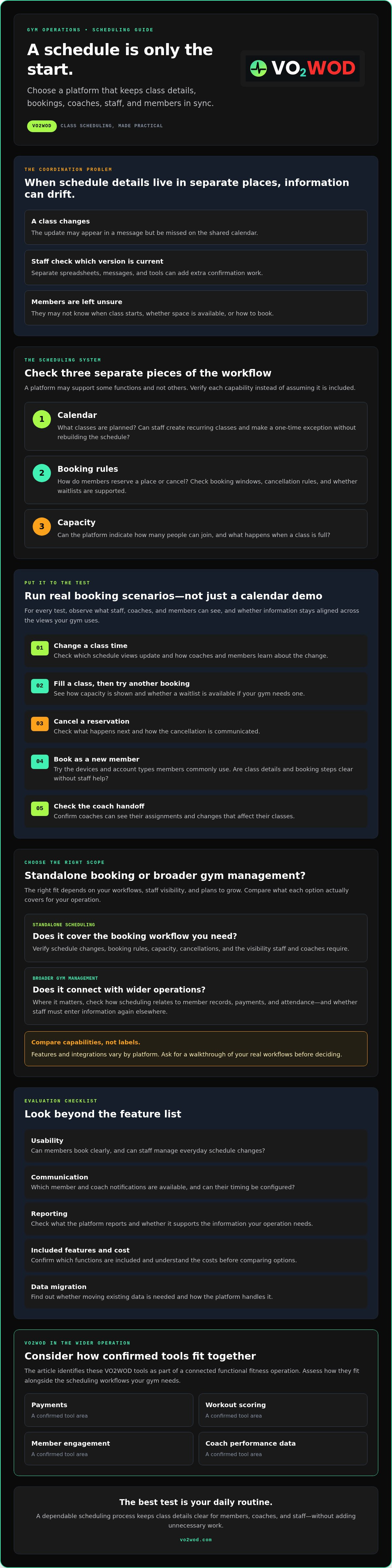
Evaluate the calendar, booking rules, and class capacity as separate parts of the process. The calendar shows what’s planned. Booking rules explain how members reserve a place or cancel. Capacity controls indicate how many people can join, if the platform supports them. Don’t assume every tool handles all three.
Clear, consistent information gives members a better idea of what to expect and gives staff and coaches a shared reference point. But the details matter: booking, waitlists, and member notifications vary by platform, and some may not be available.
Ask vendors to show how a class update appears to staff, coaches, and members. Check whether changes sync across the views your gym uses, and confirm which booking workflows are included. A polished calendar is useful, but a process that keeps people aligned is what supports day-to-day coordination.
Which Gym Class Scheduling Features Should You Evaluate?
Start with the everyday jobs your gym needs the software to handle. Separate essential workflows from optional conveniences before comparing platforms. A clean interface may look appealing, but it won’t help if staff still have to update multiple calendars or explain unclear booking rules.
Ask whether the platform can show the current class schedule, apply your booking and capacity rules, handle changes and cancellations, and keep members and coaches informed. Then check how schedule information connects with member records, payments, and attendance where those connections matter to your operation. Treat each capability as something to verify, not assume.
Class calendars, booking rules, and capacity
Look closely at the calendar workflow. Can staff create recurring classes and make a one-time exception without rebuilding the schedule or correcting duplicate entries? Ask whether capacity limits, booking windows, and cancellation rules can be set to match how your gym runs. If waitlists matter, confirm that they’re supported and find out how members learn when a place opens. These capabilities vary by platform.
Test the answers with real scenarios. Change a class time and check which schedule views update. Fill a class and try to book another spot. Cancel a reservation and see what happens next. A feature list tells you what a vendor says is available; a practical walkthrough shows how the workflow feels for staff and members.
Coach workflows and member communication
Coaches need a clear view of their current assignments, including changes that affect their classes. Ask whether they can access that information themselves and how updates reach them. For member notifications, check which types are available, whether timing can be configured, and whether staff need to send updates through a separate channel.
Test the booking experience on the devices and with the account types your members commonly use. Try a new-member booking as well as a returning member’s reservation. Notice whether class details and instructions are easy to find and whether the steps are clear without staff help.
Keep the evaluation grounded in your daily work. Test a class change, a full class, a cancellation, and a new-member booking. Then ask what happens to related payment, attendance, and member-record information, and whether staff would need to enter it again elsewhere. Separate core needs from optional features such as configurable notifications or waitlists, and compare platforms on the workflows your gym relies on.
If scheduling needs to sit alongside broader functional fitness operations, you can explore VO2WOD’s platform and verify directly which scheduling capabilities are currently supported.
Standalone Booking Tool or Gym Management Platform: Which Fits?
The right choice depends on what your gym needs to coordinate. A focused booking tool may cover class reservations with less setup. A broader gym management platform may bring scheduling into the same operating picture as payments, member data, and workout scoring. Manual processes are another option, but they rely on staff keeping information aligned by hand.
Compare the day-to-day trade-offs, not just the feature count:
| Approach | Workflow coverage | Data entry and visibility | Reporting and room to grow |
|---|---|---|---|
| Standalone booking tool | Focused on class calendars and reservations. Confirm the specific booking rules available. | May require separate member records or manual updates if other tools don’t connect. | May offer limited operational reporting, but can suit a gym with simple needs. |
| Broader gym management platform | May bring scheduling alongside functions such as payments, member management, or workout scoring. Verify what’s included. | Could reduce duplicate entry if workflows and records are connected as needed. | May provide a wider operational view as needs expand. Check reporting and capabilities. |
| Manual process | Staff maintain calendars, spreadsheets, and messages. | Updates may need to be repeated across tools, and staff visibility depends on keeping them current. | Reporting often requires extra tracking, and the process may become harder to maintain as operations grow. |
When a focused class booking tool may be enough
If your main challenge is letting members view classes and reserve spots, a focused tool may fit. A narrower workflow isn’t automatically a drawback. Check whether it handles your class patterns, then look at what happens to member information elsewhere. If staff must re-enter bookings or reconcile records manually, include that ongoing work in your comparison.
When broader gym management may reduce tool sprawl
If scheduling needs to sit alongside payments, workout scoring, and member data, a broader platform may help you assess those workflows together. But an “all-in-one” label doesn’t guarantee that every feature connects in the way your gym needs. Ask for a walkthrough of the specific handoffs, records, and reports you rely on.
VO2WOD’s confirmed capabilities include automated payments, workout scoring, Vo2hub, and live athlete performance dashboards. Its class scheduling and booking functions aren’t confirmed here, so verify them directly against your requirements. For additional context, read the 2026 functional fitness gym software guide.
Choose the gym class scheduling platform that fits your current needs and leaves a manageable path forward. A gym with straightforward reservations may value simplicity; a facility coordinating several connected workflows may prioritize broader coverage. In either case, check for duplicate data entry, staff visibility, reporting, and the effort required to adapt as your operation changes.
How to Evaluate a Gym Class Scheduling Platform Before You Switch
A platform demo is most useful when it reflects the work your team actually does. Before comparing screens, map your current process and the information you need to carry forward. Then test how the tool serves members, coaches, and staff, not just the person managing the account.
- Document your current needs. List class types, recurring schedules, exceptions, booking rules, capacity limits, and the steps staff take when something changes. Note where payment, member, or workout information is managed today.
- Identify the friction. Ask coaches and staff where updates get missed, records are re-entered, or member questions often arise. Separate must-have workflows from conveniences.
- Prepare realistic test cases. Include a class change, a cancellation, a full class, a new-member booking, and a handoff between staff and coach. Decide what a successful outcome looks like for each.
- Test the demo with your team. Have staff and coaches try the same scenarios. Record which steps feel clear, which require extra work, and which answers need confirmation from the vendor.
- Confirm the transition plan. Ask what data can be exported and transferred, in what formats, who prepares it, and how migration progress is checked. Confirm staff training and ongoing support arrangements before committing.
Build a realistic scheduling test
Use your actual weekly pattern as the test script, including recurring classes and known exceptions. For a class change, check what staff and coaches must update and what members can see. For a cancellation or capacity limit, test the workflow instead of relying on a feature checklist. Ask new and returning members to try booking, too. Note every confusing step or manual workaround.
Plan the move without losing operational context
Member records, payment information, and workout data may not all transfer in the same way. Ask which information is supported, what format is required, and what your gym must review or prepare. Clarify the migration scope in writing, along with responsibilities, training, and how you’ll verify records after the move.
VO2WOD offers data migration assistance, but confirm the supported formats and scope for your situation. If you’re weighing a change, use this gym software switching checklist to plan the transition. You can also ask about VO2WOD data migration assistance and verify what it covers for your gym.
A careful test makes the choice less abstract. You’ll see where a gym class scheduling platform fits your real workflows and where you need clearer answers before switching.
How VO2WOD Fits into a Connected Functional Fitness Operation
A scheduling decision is part of a wider operating picture. A functional fitness gym may need software to support administration, payments, workout data, and coaching workflows alongside its class scheduling tools. VO2WOD’s confirmed capabilities offer a starting point for assessing that broader fit, but class booking features need to be verified separately.
Match confirmed platform capabilities to your requirements
Map the platform’s stated tools to needs you’ve already identified. VO2WOD provides gym management software, automated payments, and automated workout scoring. Vo2hub centralizes workout data and supports member engagement. The Live Athlete Performance Dashboard gives coaches access to real-time workout metrics and visibility into athlete performance.
These capabilities may be relevant if you want to bring parts of your gym’s administrative and performance workflows into a more connected operation. They don’t confirm a class calendar or reservation system. If your gym class scheduling platform requirements include recurring classes, capacity limits, bookings, waitlists, or reminders, ask VO2WOD directly whether those features are currently supported, what’s included, and how they’re set up.
For more on how connected information can support gym operations, explore this centralized gym data platform guide.
Take a low-friction next step
Before speaking with the platform team, write down your must-have scheduling workflows and the operational tasks you’d like software to support. Keep questions specific: Can the platform handle your required class booking process? Which capabilities are included? What setup responsibilities fall to your gym? Clear questions help distinguish confirmed features from assumptions.
If a move is part of your plan, ask about VO2WOD’s data migration assistance, including which information can be transferred, the required formats, and what your team needs to prepare. Confirm the scope rather than assuming every record or workflow will move in the same way.
Choosing software should make daily work clearer, not add another layer of uncertainty. Explore VO2WOD and discuss how its confirmed functional fitness capabilities, migration assistance, and any verified scheduling features align with your gym’s needs.
Choose a Setup That Keeps Your Gym Moving
The right gym class scheduling platform should fit the way your members, coaches, and staff coordinate classes, not simply display a timetable. Compare options against your real workflows, test the details that matter, and confirm scheduling capabilities before you commit. A manageable transition matters too, especially when member and operational information needs to move with you.
For functional fitness gyms assessing broader operations, VO2WOD includes automated payments, workout scoring, Vo2hub, and a Live Athlete Performance Dashboard. Data migration assistance is also available. Class calendars and booking features aren’t confirmed, so ask the team directly whether they meet your requirements.
Explore VO2WOD and discuss your gym’s needs to see how its confirmed capabilities and migration assistance may fit your operation. With clear priorities and the right questions, you can make a thoughtful choice and create a smoother experience for your gym community.
Frequently Asked Questions
What is a gym class scheduling platform?
A gym class scheduling platform is software that organizes class schedules and, depending on the product, related booking workflows. Some tools focus mainly on reservations, while others are part of broader gym management software. Before choosing, list the functions you need, such as recurring calendars, capacity controls, cancellations, waitlists, staff visibility, or member notifications. Feature availability varies, so confirm each requirement with the provider.
Do gyms need a separate class booking app?
No, a separate app isn’t necessary for every gym. It may suit a facility that needs a straightforward way for members to reserve classes. A broader management platform is worth evaluating if you also want to coordinate payments, member records, workout scoring, or administrative work. Compare each option against your actual tasks, and verify which scheduling features are included rather than assuming an “all-in-one” label covers them.
Can a gym scheduling platform manage class capacity and waitlists?
Some platforms support capacity limits and waitlists, but the exact process differs. Ask whether members can join a waitlist, how an open spot is offered or assigned, and what notifications are sent. During a demonstration, try booking a full class and then cancelling a reservation. Confirm the platform’s behavior with the provider, ideally in writing, before relying on it for daily bookings.
How do I choose the right class scheduling platform for my gym?
Start by listing your class types, recurring schedules, capacity needs, coach workflows, and member booking expectations. Then test those situations in a product demonstration. Compare ease of use, reporting, connected management tasks, support, and migration requirements. The best fit is the one that matches your gym’s routine and can handle its essential workflows, not necessarily the one with the longest feature list.
What should I check before switching gym scheduling software?
Before switching, confirm what information can be exported and transferred, which formats are supported, and who will prepare the data. Ask whether the provider offers migration assistance and clarify its scope. Test a representative schedule, including how staff and members will use the new process. Also confirm setup responsibilities, training, support, and essential features. A written transition plan helps everyone understand what needs to happen.
Does gym management software always include class scheduling?
No. Gym management software can combine different administrative, payment, member, and workout tools, and the category name doesn’t confirm that scheduling is included. A provider may offer some scheduling functions without supporting every calendar, booking, waitlist, or reminder workflow you need. Ask for a demonstration of your must-have scenarios, then confirm feature availability, plan inclusion, and setup requirements directly with the provider.
Can VO2WOD be used as a gym class scheduling platform?
VO2WOD’s confirmed capabilities include gym management, automated payments, automated workout scoring, Vo2hub, a Live Athlete Performance Dashboard, and data migration assistance. Its product information doesn’t confirm class calendars or booking functions. If you’re considering VO2WOD as a gym class scheduling platform, ask the team to verify the specific scheduling features you need and demonstrate those workflows before deciding whether it fits.


