

What does a workout score tell you if you don’t know how hard the session felt? For gym owners and coaches, athlete effort tracking software can bring workout results and athlete feedback into clearer view. But a score alone isn’t the whole story, and scattered notes or spreadsheets can make useful patterns hard to find.
It’s understandable to want consistent records without turning class into paperwork. Coaches need a practical way to capture effort, connect it to the workout, and use it as a starting point for conversation, not as a verdict on an athlete’s performance.
This guide explains what to track, how to review effort alongside workout context, and what to check when assessing software. You’ll also learn how to fit a tracking routine into class, what connected workout data and automated scoring can contribute, and how to involve athletes without adding unnecessary steps.
Key Takeaways
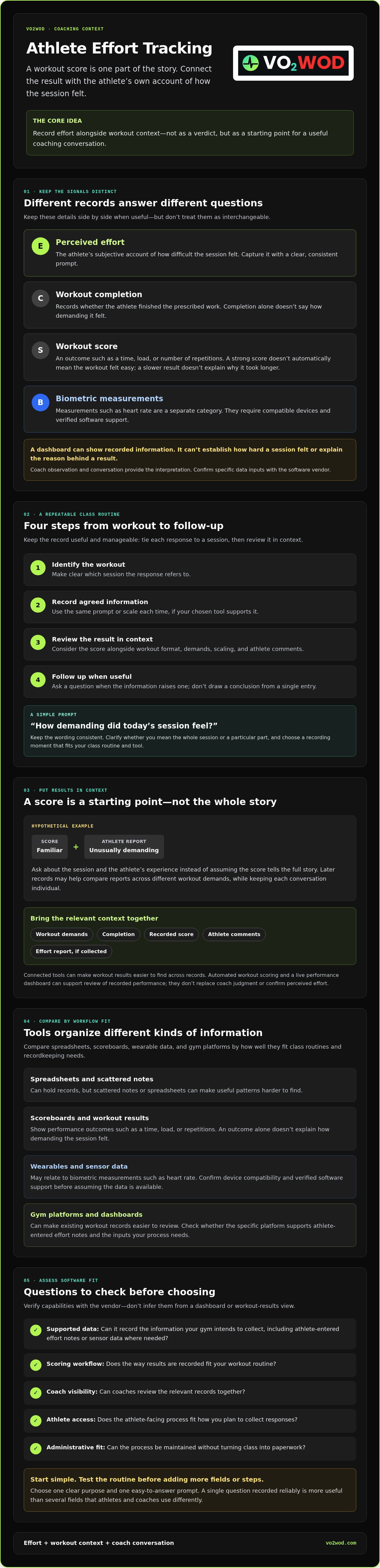
- Keep athlete-reported effort, workout completion, scores, and biometric measurements distinct. Each offers different information for coaching.
- Use a simple routine: identify the workout, record agreed information, review the results, and follow up with athletes when useful.
- Choose athlete effort tracking software by checking supported data, scoring workflow, coach visibility, athlete access, and administrative fit.
- Compare spreadsheets, scoreboards, wearable data, and gym platforms based on how well each fits your class workflow and recordkeeping needs.
- Start with one clear purpose and a simple prompt, then test the process before adding more fields or steps.
What athlete effort tracking software captures in a functional fitness gym
Athlete effort tracking software organizes athlete-reported or workout-related information so coaches can review it in context. In a functional fitness class, that context might include the workout, whether an athlete completed it, the recorded score, and a separate report of how demanding the session felt. These details can sit alongside one another, but they aren’t interchangeable.
The broader Quantified Self movement explores using personal data for self-monitoring. In a gym, the useful question isn’t simply how much data you can collect. It’s whether the information helps a coach understand an athlete’s experience and decide what to ask next.
Perceived effort, workout score, and biometric data are different
Perceived effort is an athlete’s subjective account of how difficult a session felt. Workout completion records whether the athlete finished the prescribed work, while a score captures an outcome, such as a time, load, or number of repetitions. A strong score doesn’t automatically mean the workout felt easy, and a slower result doesn’t explain why it took longer.
Biometric measurements, such as heart rate, are another category. They require compatible devices and verified software support. Don’t assume a gym platform records sensor data or athlete-entered effort notes just because it displays workout results. Check the specific inputs with the vendor.
A dashboard can make existing records easier to see. It can’t establish how hard a session felt or explain the reason behind a result. Coaches provide that interpretation through observation and conversation.
Why functional fitness coaches track effort over time
A consistent record gives a coach something concrete to revisit: the workout demands, the athlete’s result, and, where collected, the athlete’s own account of difficulty. Reviewing these together can help frame a useful follow-up without turning a single score into a conclusion about health or future performance.
Hypothetical example: An athlete completes a workout with a familiar score but reports that it felt unusually demanding. The coach can ask about the session and the athlete’s experience rather than assuming the score tells the full story. Records from later classes may also help the coach compare the athlete’s reports across different workout demands, while keeping each conversation individual.
Connected tools can reduce the effort of finding workout results across separate records. VO2WOD’s automated workout scoring and Live Athlete Performance Dashboard support the review of recorded workout performance. They don’t replace coach judgment or confirm perceived effort. Read more about live athlete performance metrics and dashboard context.
How effort tracking turns workout data into coaching context
A useful record starts with a clear routine, not a crowded form. Tie each response to a specific workout, collect only information your gym can actually record, review it beside the result, and decide whether a conversation is helpful. Athlete effort tracking software can make workout records easier to review, but the value comes from a consistent process and a coach who treats each entry as one piece of context.
A simple sequence keeps the work manageable:
- Identify the workout: Make clear which session the response refers to.
- Record agreed information: Use the same prompt or scale each time, if your chosen tool supports it.
- Review the result: Consider the score alongside the workout format and any athlete comments.
- Follow up: Ask a question when the information raises one, rather than drawing a conclusion from a single entry.
Choose a consistent effort question and recording moment
Use plain language athletes can answer quickly, such as, “How demanding did today’s session feel?” Keep the wording consistent, and make clear whether you’re asking about the whole session or a particular part. Choose a recording moment that fits your class routine, such as after the workout, only if your process and software support that option.
Before adopting a digital workflow, confirm with the vendor whether the software supports athlete-entered effort notes, custom fields, a chosen scale, or your preferred collection method. Don’t assume those capabilities are included. One simple question recorded reliably is more useful than several fields that athletes and coaches use differently.
Review effort alongside workout scores and context
Scores add useful detail, but they need a frame. Consider the workout’s movements, duration, loading or scaling, the athlete’s comments, and relevant training history where available. The same result can reflect different experiences, so avoid comparing athletes as if their scores tell the whole story.
Hypothetical example: Two athletes record similar results for a workout, but one reports that it felt much more demanding. That difference is a reason to check in, not proof of a problem. A coach might ask which part felt hardest or whether the athlete changed the planned movements. The answer can explain the record in a way the score alone cannot.
Look for useful context, not a verdict. One entry can’t establish fatigue, readiness, overtraining, or injury risk, and software alone can’t make that judgment. Automated workout scoring and a live dashboard can help organize recorded performance for review. Confirm separately whether a platform supports effort inputs. If you’re considering VO2WOD, review its gym performance platform as part of your evaluation.
Effort tracking software versus spreadsheets, scoreboards, and wearables
Each tracking method offers a different balance of effort input, workout context, visibility, and staff workload. The right fit depends on what coaches need to review and how reliably the information can be captured. More metrics don’t automatically mean more useful coaching context.
| Approach | Effort input | Workout context and visibility | Record consistency and staff workload |
|---|---|---|---|
| Paper or spreadsheets | Can capture an athlete’s own report if there’s a clear prompt. | Context depends on how records are organized and who can access them. | Flexible to start, but manual entry and upkeep can become repetitive. |
| Workout scoreboards | Usually show scores, not necessarily perceived effort. | Make results visible to the class, but may offer limited space for individual context. | Simple for sharing results; separate notes may require extra recording. |
| Wearable data | Provides device-dependent readings, not an athlete’s subjective account. | Available readings and visibility depend on the device and compatible software. | Setup, access, and record handling depend on the devices and workflow in use. |
| Gym-platform software | Effort-entry options vary. Confirm them with the vendor. | Can bring supported workout records and scores into a shared view. | May reduce duplicate handling if the workflow fits; setup and data entry still matter. |
When simple tracking is enough, and when software helps
A small, consistent manual process may be enough if coaches can record the agreed information, find it when needed, and use it in follow-up conversations. A spreadsheet isn’t automatically a problem. Friction appears when the same result is entered in multiple places, notes become hard to locate, or coaches can’t see a useful record during their workflow.
That’s when athlete effort tracking software may help organize the information coaches already use. Judge it by whether it makes records easier to capture and review, not by the number of fields it offers.
What a performance dashboard can and cannot tell you
A dashboard can make supported workout performance information easier to view together. For example, VO2WOD’s Live Athlete Performance Dashboard and automated workout scoring support the visibility of recorded performance and scores. Confirm directly whether any platform also supports athlete-entered effort notes, wearable integrations, or other specific inputs.
A visible score is still a score. A sensor reading is still device-dependent data. Neither establishes how demanding the session felt to the athlete or explains why a result changed. Coaches bring those details into focus through questions and knowledge of the workout. For wider selection criteria, see this guide to functional fitness gym software.
How to introduce athlete effort tracking without adding friction
A tracking routine should support coaching, not compete with it. Before choosing athlete effort tracking software or adding another form, decide what question you want the information to help answer. Then build the process around the class, explain it clearly, test it, and keep only what proves useful.
A low-friction rollout can follow five steps:
- Set a purpose: Identify the coaching conversation the record should support.
- Choose one prompt: Ask a plain-language question athletes can answer consistently.
- Explain the process: Tell members why you’re collecting responses, who can view them, and how coaches may use them.
- Test the routine: Try it across representative classes before expanding it.
- Review usefulness: Ask coaches and athletes what felt clear, awkward, or unnecessary.
Begin with the minimum information needed for a real coaching conversation. Extra fields can wait. If the prompt is unclear or staff can’t review responses, collecting more detail will add work without adding much value.
Set expectations before collecting effort information
Agree on what the prompt means. If you ask how demanding a workout felt, clarify whether athletes should think about the whole session or a specific part. Use the same wording and explain that a subjective response is an athlete’s perspective, not an objective assessment or diagnosis.
Be transparent about access. Tell members whether responses are optional and who will see them, based on your actual process. Before promising that entries are private or visible only to certain people, verify the software’s permission controls and settings. Trust grows when the explanation matches how information is handled.
Make tracking fit the class routine
Choose a clear moment for recording or reviewing information, such as a planned check-in after the workout, if your chosen tool supports that method. Avoid interrupting instruction or turning class transitions into tech support. During the pilot, note whether coaches can follow the routine and whether athletes understand the prompt and take part.
Use automation only for tasks the platform is confirmed to support. For example, VO2WOD offers automated workout scoring, but don’t assume that means it also collects perceived-effort reports. Confirm any effort-entry options directly with the vendor. After the pilot, adjust the prompt, timing, or process based on feedback before deciding whether to expand it.
To consider how workout records and gym workflows might fit together, explore VO2WOD’s gym management platform.
Choosing Athlete Effort Tracking Software for Your Gym
The right athlete effort tracking software should fit the way your coaches and athletes already work. Start with the decisions it needs to support, then check whether a platform captures the information you need, makes records easy to review, and keeps administration manageable. A long feature list won’t help if the workflow creates more interruptions than clarity.
Questions to ask before choosing a platform
- Supported data: Which workout results, effort inputs, and other metrics does the platform support? Can athletes enter their own effort reports, or would your gym need another process?
- Scoring workflow: How are workout scores recorded and displayed? Can coaches review results in the context of the relevant workout?
- Coach visibility: What information can coaches see, and how is it presented? Confirm permissions rather than assuming every staff member has the same access.
- Athlete access: Can athletes view or enter the information they need? Ask how that works in practice and whether it fits your class routine.
- Administrative fit: Check which gym-management tasks the platform supports, plus data migration options if you’re moving records from another system.
Ask vendors directly about integrations, data exports, permission controls, and athlete effort-entry options. Confirm how any third-party connection works and which records can be taken with you. These details can shape your day-to-day workflow as much as a dashboard view.
For a practical test, take one representative class and trace the whole process: how a workout is set up, how its score is recorded, what a coach can review, and where an effort report would fit if supported. Any unclear or manual step is worth asking about before you commit.
Where VO2WOD fits in an effort-tracking workflow
VO2WOD offers a Live Athlete Performance Dashboard for real-time performance visualization, automated workout scoring, and Vo2hub to centralize gym workout data. Its gym management tools include automated payments and administrative tasks. These features can support visibility and review, but they don’t establish that the platform collects perceived-effort reports or biometric readings.
Verify whether the available inputs match your effort-tracking process. Ask specifically about athlete self-report, permissions, exports, and integrations, then compare the answers with your coaches’ needs. A platform should support the records you intend to use, while leaving interpretation and follow-up in coaches’ hands.
Explore VO2WOD’s gym performance platform and assess how its confirmed features fit your gym’s workflow.
Make effort records more useful in your next coaching conversation
Effective effort tracking isn’t about collecting every possible metric. It’s about capturing consistent information, connecting it to the workout, and using it as a prompt for coach-athlete conversation. A score shows an outcome; an athlete’s own report adds perspective. Neither tells the whole story on its own.
Choose athlete effort tracking software based on how well it fits your class routine, what information it truly supports, and whether coaches can review records without adding unnecessary work. Start with a clear prompt and a small, practical process. Then adjust based on what athletes and coaches find useful.
VO2WOD brings together a Live Athlete Performance Dashboard, automated workout scoring, and Vo2hub to centralize gym workout data. Data migration assistance can also support a transition from a legacy system. These tools can help organize workout records, while coaches remain responsible for interpreting them and following up with athletes.
To assess how VO2WOD’s gym management and performance tools fit your workflow, explore the platform. A thoughtful, consistent approach can make records easier to use and keep coaching conversations human.
Frequently Asked Questions
What is athlete effort tracking software?
Athlete effort tracking software organizes workout-related information so coaches can review results and athlete feedback together. Depending on the platform, records may include workout scores, athlete-entered effort reports, or compatible sensor readings. These are distinct data types, not substitutes for one another. Before choosing a tool, confirm which inputs it supports, how records connect to a workout, and what athletes and coaches can view.
How do coaches track athlete effort during a workout?
Coaches can track effort through a consistent routine for recording workout results and, if supported, an athlete’s own effort report. Choose one clear prompt and a recording moment that doesn’t disrupt instruction. Then review the response alongside the workout format, score, and conversation with the athlete. Keep the process simple enough to repeat across classes. A single entry isn’t a complete measure of exertion or readiness.
Can workout scores show how hard an athlete worked?
A workout score describes an outcome, such as a time or repetition count, based on the workout and scoring method. It doesn’t automatically show how demanding the session felt to the athlete. For example, two athletes with similar scores may describe very different experiences. Treat the score as one piece of context, and check how the software defines and records each result before comparing performance over time.
Is heart-rate data the same as perceived effort?
No. Heart-rate data comes from a sensor, while perceived effort is an athlete’s subjective account of how demanding a session felt. The two may offer different perspectives, but neither should be treated as interchangeable with the other. Device readings depend on compatible equipment and software support. Before adopting a tracking workflow, confirm that the platform supports the specific sensor data or athlete-reported input you want to use.
What should gyms look for in athlete effort tracking software?
Look for athlete effort tracking software that fits the information coaches actually use and the way classes run. Check supported effort inputs, workout scoring, coach visibility, athlete access, and the amount of manual entry required. Ask vendors about permissions, integrations, data exports, and migration options. Verify that any effort-reporting or biometric feature you need is supported in the specific platform and plan you’re evaluating.
Can athlete effort tracking software prevent overtraining or injuries?
No software record can diagnose an athlete or guarantee prevention of injury or overtraining. Workout scores and effort reports may help coaches review information and start a conversation, but they don’t establish a medical conclusion. Consider the athlete’s account and relevant context rather than relying on one entry or dashboard display. If an athlete has a health concern, encourage them to seek guidance from a qualified professional.
Does VO2WOD measure athlete effort or heart rate?
VO2WOD’s confirmed features include a Live Athlete Performance Dashboard, Vo2hub for centralizing gym workout data, and automated workout scoring. The available product information doesn’t confirm heart-rate measurement, wearable integrations, or a dedicated perceived-effort input. If those capabilities matter to your gym, ask VO2WOD directly which data fields and integrations are supported, and confirm how coaches and athletes can access the records.


