
What if the most useful thing on your gym screen isn’t another timer or workout graphic, but the right information at the right moment? Coaches know how quickly a class can stall when they have to repeat instructions or update a whiteboard. Members can lose track of the workout, timing, or their scores. Gym workout display software can bring key details into view, but only when the screen supports the session instead of adding noise.
A useful display makes the workout easier to follow and gives coaches more room to watch movement, offer cues, and connect with members. The key is choosing what to show, when it matters in the class, and whether performance information is clear and comfortable for the people in the room. More data isn’t automatically better.
This guide explains what gym workout display software can show and how to compare options against your gym’s workflow. You’ll learn how live performance dashboards and connected workout scoring can complement coaching, what to consider when displaying member results, and how to keep screens focused on useful information. The goal is a class that feels clearer, not busier.
Key Takeaways
- Choose gym workout display software for clear instructions and useful class-flow cues, not visual effects alone.
- Compare instruction displays, timer-led systems, and performance dashboards by readability, coach workload, data connection, and member comfort.
- Treat a live display as part of a workflow: prepare the workout, capture scores or metrics, surface relevant information, and coach with that context.
- Pilot one class format first. Use coach and member feedback to refine what appears on screen before making it a regular habit.
- VO2WOD’s Live Athlete Performance Dashboard visualizes athlete performance during workouts, complementing coach judgment and member interaction.
Why Gym Workout Displays Must Do More Than Fill a Screen
The class is ready to move, but half the room is looking around. What comes next? How long is the interval? Where should scores go? The coach repeats the sequence while also trying to watch form. It’s a familiar moment, and it shows why a screen needs a clear purpose.
Gym workout display software presents workout information on a shared gym screen so members can follow the session and coaches can keep their attention on the room. Depending on the system, that information may include instructions, timing, or performance data. A screen can make class flow easier to follow, but it shouldn’t become another task for the coach to manage.
Showing content and giving a class useful context are not the same thing. A timer signals when to start or stop, while workout details explain what members are doing. Performance information can add another layer when it is relevant and understandable. A useful display gives each item a specific job.
What gym workout display software can show
Display approaches differ, so match the information to the needs of the class. Common categories include:
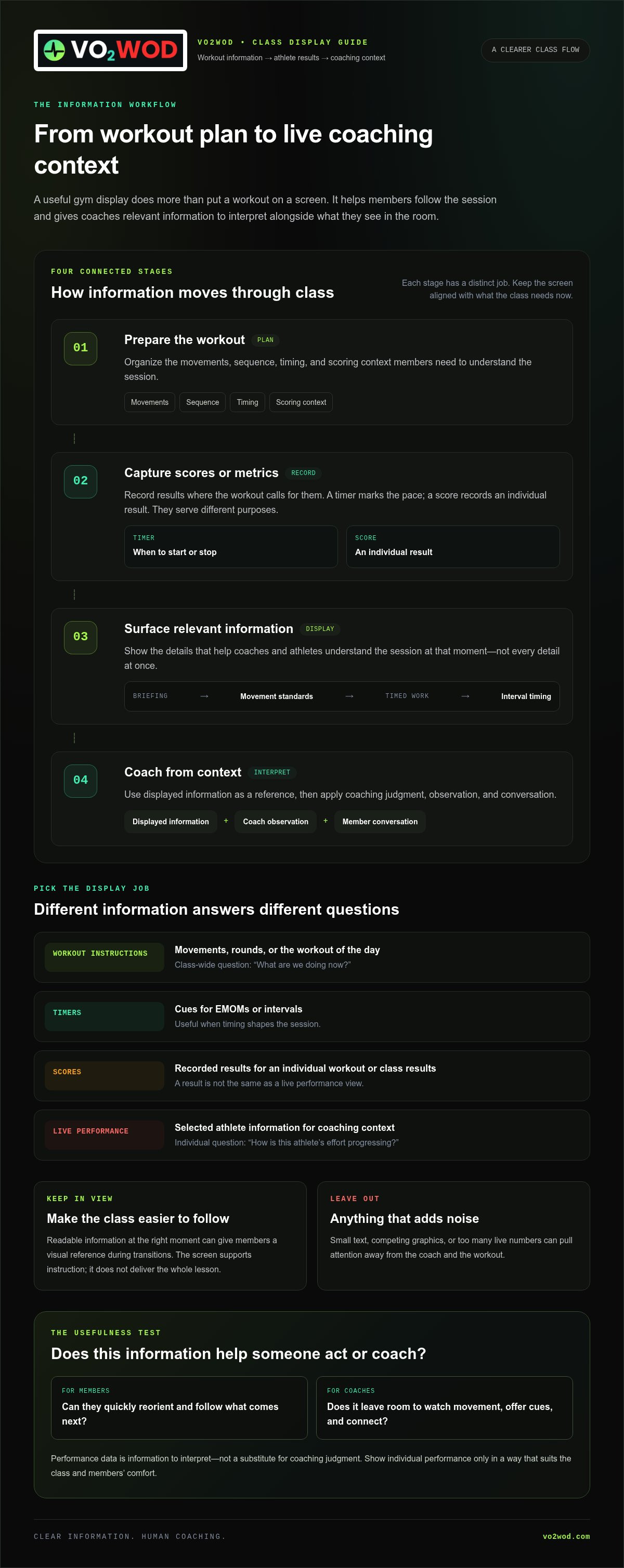
- Workout instructions: Movements, rounds, or the workout of the day for the whole class.
- Timers: Cues for formats such as an EMOM or intervals, where timing shapes the session.
- Scores: Recorded results that help members follow their own workout or view class results.
- Live performance indicators: Selected athlete information that can give a coach context during a workout.
Class-wide information answers, “What are we doing now?” Individual information answers, “How is this athlete’s effort progressing?” Those are different display jobs. Separate them when deciding what belongs on screen, and show individual performance only in a way that suits the class and members’ comfort.
When a gym screen helps instead of adding noise
Readable information shown at the right moment can give members a visual reference during transitions. In a functional fitness class moving from a briefing into timed work, the screen might keep the movement sequence and timing visible while the coach explains the standard and checks that members are ready. The display supports the instruction; it doesn’t deliver the whole lesson.
Small text, competing graphics, or too many live numbers can pull attention away from the coach and the workout. Choose what members need to act, then leave out what they don’t. Performance data also needs context. Exercise physiology helps explain how the body responds to exercise, but a displayed number is information to interpret, not a substitute for coaching judgment. For background, see Exercise Physiology.
A screen earns its place when it reduces uncertainty without taking over the room. Members can glance up to reorient themselves. Coaches can use shared information as a reference, then focus on cues, movement, and connection. The goal isn’t a busier screen. It’s a class that feels easier to follow.
How Gym Workout Display Software Turns Workout Data Into Live Context
A workout on a screen is only the starting point. The more useful question is how information moves from the planned session to athlete results, and then into the coach’s view. Gym workout display software can support that flow when the information shown relates to what’s happening in class.
Displaying a workout tells members what to do; visualizing workout performance connects recorded results to the coach’s view of how the session is unfolding. Those jobs can work together, but they aren’t the same. An instructor-controlled timer marks the pace of a workout. An athlete-entered score records an individual result. A live performance dashboard presents performance information for coaching context. Each has a distinct role.
From workout preparation to an on-screen session
The workflow starts with the workout’s structure. Movements, intervals, and scoring rules give members a reference for the session and help clarify what comes next. The coach decides which details matter at each point. During a briefing, the focus may be on movement standards; during timed work, the interval may be more useful. Keep the display aligned with the class rather than loading it with every detail.
- Prepare the workout. Organize the movements, sequence, timing, and scoring context members need to understand.
- Capture scores or metrics. Record results where the workout calls for them. A timer and a score serve different purposes.
- Surface relevant information. Present the details that help the coach and athletes understand the session at that moment.
- Coach from context. Use the information as a reference, then apply coaching judgment, observation, and conversation.
That’s an information workflow, not simply workout content mirrored onto a TV. Visualization is most useful when it makes relevant information easier to interpret, a principle also discussed in Data Analytics and Visualization in Sports.
From athlete scores to a live performance view
A recorded score can help a coach review how an athlete performed in a session. On its own, though, a stored result is not a live view. A dashboard adds a visual layer that can bring performance information into the coach’s awareness during the workout. The coach still interprets the context and decides whether a cue, check-in, or adjustment is appropriate.
VO2WOD brings Automated Workout Scoring together with its Live Athlete Performance Dashboard, which visualizes athlete performance during workouts. Scoring and live performance information are connected within the wider platform, rather than treating the screen as a separate content surface. For a broader view of how shared information fits into gym operations, see this guide to centralized gym data platforms.
The value is context, not a substitute for coaching. A display can make workout information and recorded performance easier to follow, while the coach stays responsible for reading the room and supporting each athlete. VO2WOD’s workout scoring and performance platform connects these capabilities.
How to Compare Gym Workout Display Software Without Buying Screen Flash
A polished screen can look impressive in a demo. That doesn’t prove it will make class easier to coach. Compare gym workout display software by asking what information it presents, who needs it, and when it becomes useful. The right display solves a class problem. It doesn’t just decorate the room.
Start by matching the display type to the work it needs to do. The table offers a practical comparison. Treat each column as a display approach, then evaluate the features included in the system you’re considering.
| What to compare | Instruction display | Timer-led system | Live performance dashboard |
|---|---|---|---|
| Workout readability | Shows movements, sequence, or workout details. | Makes intervals or countdowns easy to follow. | Surfaces selected scores or performance information. |
| Class-flow support | Helps members refer back to workout structure. | Signals shared starts, stops, and transitions. | Adds performance context during or around the workout. |
| Data connection | May present prepared workout information. | Centers on timing information. | Can connect workout scoring with athlete performance data. |
| Coach workload | Can reduce the need to repeat visible instructions. | Can make pacing cues easier to share. | Can bring relevant performance information into view. |
| Member comfort | Keep text clear and easy to scan. | Use cues that help without distracting. | Consider how visible individual results may feel. |
Match the display type to the class problem
Choose an instruction-led display when members need to refer to movements or workout structure. A timer-led setup fits sessions where shared intervals and transitions organize the class. Consider a live performance view when coaches need scores or metrics in context. These approaches can complement one another, but adding more display types isn’t automatically better. Begin with the point where class flow currently gets unclear.
Check whether the data earns its place on screen
For each item, ask: who will use this, at what moment, and what coaching purpose does it serve? If coaches can’t act on a metric during the session, it may be better suited to later review than to a crowded screen. Prioritize information that helps someone make sense of the workout now.
Member comfort deserves equal weight. Public scores may feel energizing to some athletes and uncomfortable to others, especially in a class with varied experience or goals. Consider whether results need to be shown to the whole room or whether the coach simply needs the information. A display should support communication, not put members under unwanted pressure.
Finally, assess the screen during a real class, not just in a polished demo. Can members read the important details at a glance? Does the display help with the transition that usually needs extra explanation? Does it give the coach useful context without pulling attention away from athletes? If it can’t answer those questions, visual polish is only surface-level value.
How to Introduce Gym Workout Display Software Into a Real Class
A screen can be useful in theory and distracting in practice. The difference often comes down to how deliberately it’s introduced. Instead of changing every class at once, use gym workout display software to address one real point of friction, then learn from what happens in the room.
Choose one class moment to improve first
Start by naming the snag: unclear workout structure, missed timing cues, inconsistent score capture, or limited performance visibility. Choose one display purpose that addresses that moment. For example, if transitions are confusing, make the next movement or interval easy to spot rather than adding scores and extra metrics. Set a simple observation goal, such as fewer repeated explanations or smoother movement between workout stages.
Then roll out the change in four steps:
- Identify a class friction. Notice where members pause, ask what comes next, or need repeated direction.
- Choose useful information. Select the instruction, timing cue, score, or performance view that directly relates to that moment.
- Introduce it clearly. Explain what members will see and how it fits into the session. Keep verbal instruction and demonstrations in the mix.
- Review feedback. Ask coaches what helped, listen to member responses, and observe whether the original friction changed.
Pilot one class format before standardizing the screen across sessions. A consistent workout structure makes it easier to notice whether the display is helping or simply adding another thing to monitor. Observe different moments in the class, from briefing to transitions and score capture. Then adjust the information before expanding the practice to other formats.
Make the display comfortable and useful for members
Check readability from normal training positions, not just from beside the screen. Keep key details easy to scan, and avoid letting screen management interrupt coaching. Coaches still need to demonstrate, give verbal cues, watch movement, and make space for questions. The display is a reference point, not the class leader.
Be clear about how scores or performance information will be used. If results are visible to the group, explain their purpose and consider whether that approach feels appropriate for athletes with different experience levels and goals. Invite feedback without putting members on the spot. A quick question after class can reveal whether the screen clarified the workout, felt distracting, or made performance feel too public.
Use what you learn. If members keep glancing at the display because instructions are hard to follow, simplify the workout view. If coaches find a performance dashboard useful, keep its information relevant to coaching rather than filling the screen with every available metric. Small adjustments can make the screen feel like part of the class instead of a competing voice.
VO2WOD connects workout scoring with live athlete performance information through its gym performance tools.
How VO2WOD Connects Gym Workout Displays With Athlete Performance
A gym screen can show the plan. A performance dashboard can add context about how athletes are progressing through the workout. VO2WOD is a platform for functional fitness facilities that connects workout scoring with its Live Athlete Performance Dashboard, bringing performance information into view while class is underway.
That connection matters because a display is more useful when it relates to the workout data behind it. Instructions and timing help members follow the session; scores and live performance visualization can give coaches another reference point as they observe the class. The purpose isn’t to turn coaching into screen-watching. It’s to make relevant information easier to see alongside what the coach observes on the floor.
Use a live dashboard to support coach awareness
VO2WOD’s Live Athlete Performance Dashboard visualizes athlete performance during workouts. Coaches can use that live view as context while they monitor the session, notice how athletes are progressing, and decide where their attention is needed. It complements direct observation and conversation. The dashboard doesn’t make coaching judgments or replace a coach’s understanding of an individual athlete.
That distinction keeps performance data in its proper place. A number or score can prompt a closer look, but the coach interprets it in relation to the workout and the athlete. Live information supports awareness; personal cues, encouragement, and professional judgment still come from the coach.
Bring scoring and gym data into a clearer workflow
Automated Workout Scoring is part of the VO2WOD platform and connects with the wider performance workflow. Scores contribute to the information coaches use to understand workout performance, while the Live Athlete Performance Dashboard gives that information a visual layer during the session. The aim is a clearer path from workout results to useful context.
Vo2hub centralizes gym workout data, adding a broader information base around class and performance activity. Together, these capabilities connect the display use case to scoring and centralized data, rather than treating gym workout display software as a screen-only tool. The information shown should serve a coaching purpose and make sense to the people in the class.
- Workout scoring: Automated scoring is integrated with the VO2WOD platform.
- Live visualization: The dashboard visualizes athlete performance during workouts.
- Centralized information: Vo2hub brings gym workout data together.
For a broader overview of how VO2WOD supports functional fitness facilities, explore this functional fitness gym software guide. For a connected approach to workout scoring and athlete performance, explore the VO2WOD platform.
Make the Screen Serve the Session
Your next step doesn’t have to be a full technology overhaul. Start by deciding what coaches and members need to see at a specific moment in class. Then use that need to measure whether a display belongs in the session. The best gym workout display software isn’t the system with the busiest screen. It’s the one that makes information clear, timely, and easy to act on.
As your coaching needs evolve, look for ways to connect the class experience with the information that supports it. VO2WOD brings workout scoring, live performance visibility, and centralized gym workout data into its platform, giving coaches a connected workflow while keeping human judgment at the center.
Ready to explore a platform built around functional fitness operations and athlete performance? Explore the VO2WOD platform and take a thoughtful next step toward a screen that supports the people in your gym. Your coaches bring the expertise. The right tools can help make more room for it.
Frequently Asked Questions
What is gym workout display software?
Gym workout display software presents workout-related information on a shared screen in a fitness facility. For example, members might refer to a displayed movement sequence while the coach demonstrates technique. Some systems focus on instructions or timing, while others connect to workout results. Before choosing one, decide whether your main need is class guidance, performance visibility, or both.
Is gym workout display software the same as a gym management system?
No. Display software focuses on information shown during classes, while a gym management system can also handle broader facility operations such as payments and administrative tasks. Some platforms bring these functions together; others are more specialized. VO2WOD’s platform includes automated payments and gym administration alongside automated workout scoring, the Live Athlete Performance Dashboard, and Vo2hub. Its data migration service helps gyms transition data from existing software tools.
Can gym workout display software show live athlete performance?
Some systems can visualize athlete performance during a workout when relevant workout information is captured. VO2WOD’s Live Athlete Performance Dashboard gives coaches a view of athlete performance, connected with the platform’s automated workout scoring. This differs from a results screen that appears only after class: live information can support coach awareness during the session, while still requiring human interpretation.
Will workout display software work with my gym TV?
Compatibility depends on the software and the equipment used to show it. A gym TV may need a supported browser, an attached computer, or another compatible way to present the display. Start by identifying the screen and devices already available, then compare those with the software’s documented requirements. Don’t assume that a smart TV or a particular connection method will work with every system.
Should a gym display show individual workout scores publicly?
Only if public score visibility suits your members and class culture. Some athletes enjoy seeing a shared leaderboard; others may prefer to track progress privately or focus on personal targets. Consider the purpose of displaying scores and explain that purpose to the class. You could also keep individual results for coach review while showing only workout-wide information on the shared screen.
How much does gym workout display software cost?
Pricing varies by platform and what the subscription includes, so compare the full scope rather than a headline figure alone. Look at whether the plan covers display features, workout scoring, performance tracking, and any wider gym-management tools you need. Also account for how many screens or locations your setup requires, if those affect the plan. That gives you a more useful comparison against your budget.


